
Vista per VLANs
Prototip Xarxa Funcionant:
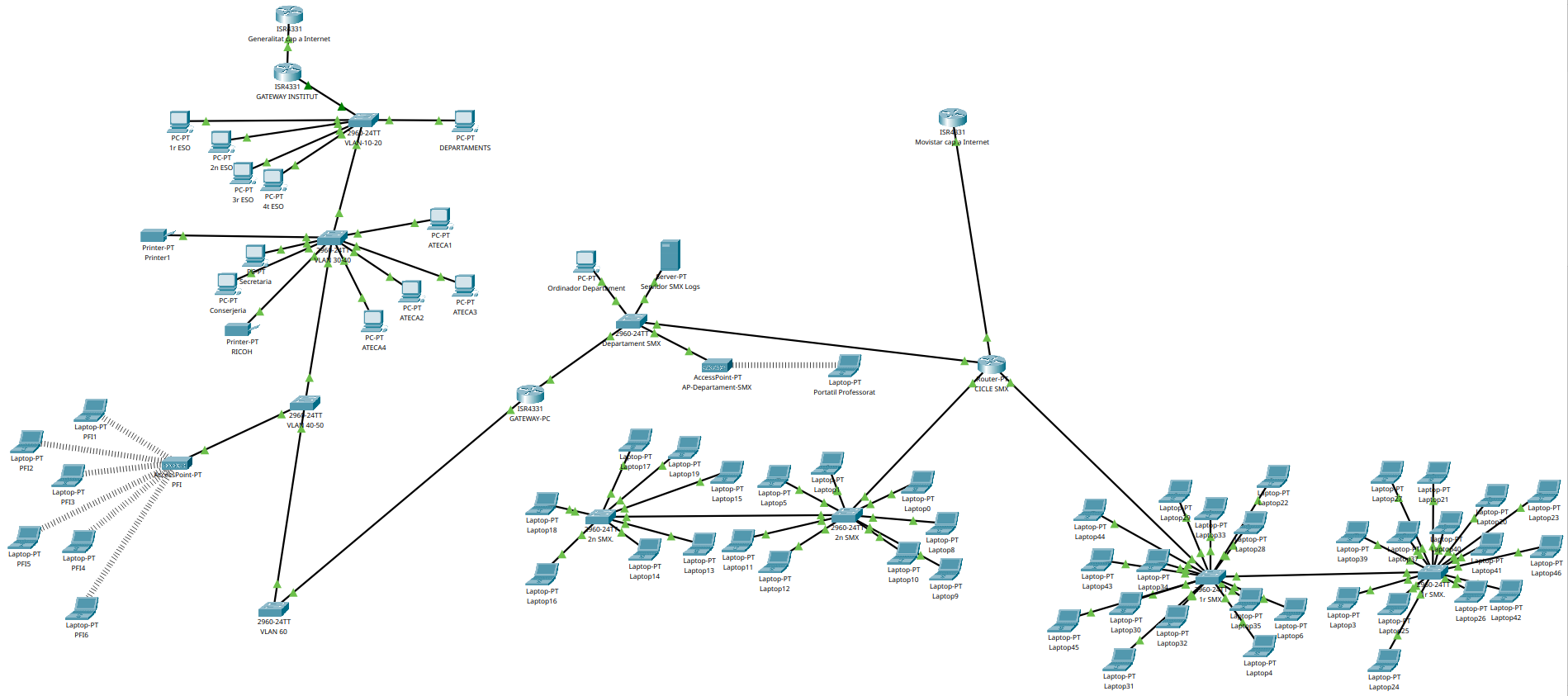
Gateway
El port físic del Gateway connectat al Switch no té una adreça IP global. En el seu lloc, es divideix en subinterfícies lògiques (una per a cada VLAN). Cada subinterfície utilitza l’encapsulament 80ez.1Q per llegir les etiquetes (tags) que venen del switch i actua com la IP de Gateway per a aquella xarxa.
El Gateway té actius múltiples pools (rangs) de DHCP de manera simultània. El router identifica de quina subinterfície (VLAN) prové la petició i assigna automàticament una IP que correspongui exactament a aquell segment de xarxa.
Router#show ip interface brief
Interface              IP-Address      OK? Method Status                Protocol
GigabitEthernet0/0/0   192.168.16.254  YES manual up                    up
GigabitEthernet0/0/1   unassigned      YES unset  up                    up
GigabitEthernet0/0/1.10172.16.0.1      YES manual up                    up
GigabitEthernet0/0/1.20172.17.0.1      YES manual up                    up
GigabitEthernet0/0/1.30172.18.0.1      YES manual up                    up
GigabitEthernet0/0/1.40172.20.0.1      YES manual up                    up
GigabitEthernet0/0/1.50172.23.0.1      YES manual up                    up
GigabitEthernet0/0/1.60172.19.0.1      YES manual up                    up
GigabitEthernet0/0/2   unassigned      YES unset  administratively down down
GigabitEthernet0/1/0   unassigned      YES unset  up                    down
GigabitEthernet0/1/1   unassigned      YES unset  up                    down
GigabitEthernet0/1/2   unassigned      YES unset  up                    down
GigabitEthernet0/1/3   unassigned      YES unset  up                    down
GigabitEthernet0/2/0   unassigned      YES unset  up                    down
GigabitEthernet0/2/1   unassigned      YES unset  up                    down
GigabitEthernet0/2/2   unassigned      YES unset  up                    down
GigabitEthernet0/2/3   unassigned      YES unset  up                    down
Vlan1                  unassigned      YES unset  administratively down down
Router#show ip route
Codes: L - local, C - connected, S - static, R - RIP, M - mobile, B - BGP
D - EIGRP, EX - EIGRP external, O - OSPF, IA - OSPF inter area
N1 - OSPF NSSA external type 1, N2 - OSPF NSSA external type 2
E1 - OSPF external type 1, E2 - OSPF external type 2, E - EGP
i - IS-IS, L1 - IS-IS level-1, L2 - IS-IS level-2, ia - IS-IS inter area
* - candidate default, U - per-user static route, o - ODR
P - periodic downloaded static route
Gateway of last resort is not set
172.16.0.0/16 is variably subnetted, 2 subnets, 2 masks
C 172.16.0.0/16 is directly connected, GigabitEthernet0/0/1.10
L 172.16.0.1/32 is directly connected, GigabitEthernet0/0/1.10
172.17.0.0/16 is variably subnetted, 2 subnets, 2 masks
C 172.17.0.0/16 is directly connected, GigabitEthernet0/0/1.20
L 172.17.0.1/32 is directly connected, GigabitEthernet0/0/1.20
172.18.0.0/16 is variably subnetted, 2 subnets, 2 masks
C 172.18.0.0/16 is directly connected, GigabitEthernet0/0/1.30
L 172.18.0.1/32 is directly connected, GigabitEthernet0/0/1.30
172.19.0.0/16 is variably subnetted, 2 subnets, 2 masks
C 172.19.0.0/16 is directly connected, GigabitEthernet0/0/1.60
L 172.19.0.1/32 is directly connected, GigabitEthernet0/0/1.60
172.20.0.0/16 is variably subnetted, 2 subnets, 2 masks
C 172.20.0.0/16 is directly connected, GigabitEthernet0/0/1.40
L 172.20.0.1/32 is directly connected, GigabitEthernet0/0/1.40
S 172.21.0.0/16 [1/0] via 192.168.16.1
S 172.22.0.0/16 [1/0] via 192.168.16.1
172.23.0.0/16 is variably subnetted, 2 subnets, 2 masks
C 172.23.0.0/16 is directly connected, GigabitEthernet0/0/1.50
L 172.23.0.1/32 is directly connected, GigabitEthernet0/0/1.50
C 192.168.16.0/22 is directly connected, GigabitEthernet0/0/0
192.168.16.0/32 is subnetted, 1 subnets
L 192.168.16.254/32 is directly connected, GigabitEthernet0/0/0Switch
El port del Switch que es connecta directament al Gateway està configurat estrictament en mode Trunk. Això permet que el trànsit de totes les VLANs de l’empresa (VLAN 10, 20, 30, etc.) viatgi multiplexat a través d’un sol cable cap al router.
Els ports que van cap als dispositius finals (ordinadors, impressores, etc.) es configuren en mode accés i s’associen a una única VLAN. El switch s’encarrega d’etiquetar el trànsit quan entra i de treure l’etiqueta quan surt cap al dispositiu.
Stuck 1
Switch#show vlan brief

VLAN Name                             Status    Ports
---- -------------------------------- --------- -------------------------------
1    default                          active
10   AULES                            active    Fa0/1, Fa0/2, Fa0/3, Fa0/4
                                                Fa0/5, Fa0/6, Fa0/7, Fa0/8
                                                Fa0/9, Fa0/10
20   DEPT                             active    Fa0/11, Fa0/12, Fa0/13, Fa0/14
                                                Fa0/15, Fa0/16, Fa0/17, Fa0/18
                                                Fa0/19, Fa0/20, Fa0/21, Fa0/22
                                                Fa0/23, Fa0/24
30   ATECA                            active
40   ADM                              active
50   PFI                              active
60   MANAGE                           active
1002 fddi-default                     active
1003 token-ring-default               active
1004 fddinet-default                  active
1005 trnet-default                    active
Switch#show interfaces trunk
Port Mode Encapsulation Status Native vlan
Gig0/1 on 802.1q trunking 1
Gig0/2 on 802.1q trunking 1
Port Vlans allowed on trunk
Gig0/1 1-1005
Gig0/2 1-1005
Port Vlans allowed and active in management domain
Gig0/1 1,10,20,30,40,50,60
Gig0/2 1,10,20,30,40,50,60
Port Vlans in spanning tree forwarding state and not pruned
Gig0/1 1,10,20,30,40,50,60
Gig0/2 1,10,20,30,40,50,60
Stuck 2
Switch#show vlan brief

VLAN Name                             Status    Ports
---- -------------------------------- --------- -------------------------------
1    default                          active
10   AULES                            active
20   DEPT                             active
30   ATECA                            active    Fa0/1, Fa0/2, Fa0/3, Fa0/4
                                                Fa0/5, Fa0/6, Fa0/7, Fa0/8
                                                Fa0/9, Fa0/10, Fa0/11, Fa0/12
40   ADM                              active    Fa0/13, Fa0/14, Fa0/15, Fa0/16
                                                Fa0/17, Fa0/18, Fa0/19, Fa0/20
                                                Fa0/21, Fa0/22, Fa0/23, Fa0/24
50   PFI                              active
60   MANAGE                           active
1002 fddi-default                     active
1003 token-ring-default               active
1004 fddinet-default                  active
1005 trnet-default                    active
Switch#show interfaces trunk
Port Mode Encapsulation Status Native vlan
Gig0/1 auto n-802.1q trunking 1
Gig0/2 on 802.1q trunking 1
Port Vlans allowed on trunk
Gig0/1 1-1005
Gig0/2 1-1005
Port Vlans allowed and active in management domain
Gig0/1 1,10,20,30,40,50,60
Gig0/2 1,10,20,30,40,50,60
Port Vlans in spanning tree forwarding state and not pruned
Gig0/1 1,10,20,30,40,50,60
Gig0/2 1,10,20,30,40,50,60Stuck 3
Switch#show vlan brief

VLAN Name                             Status    Ports
---- -------------------------------- --------- -------------------------------
1    default                          active
10   AULES                            active
20   DEPT                             active
30   ATECA                            active
40   ADM                              active
50   PFI                              active    Fa0/1, Fa0/2, Fa0/3, Fa0/4
                                                Fa0/5, Fa0/6, Fa0/7, Fa0/8
                                                Fa0/9, Fa0/10, Fa0/11, Fa0/12
                                                Fa0/13, Fa0/14, Fa0/15, Fa0/16
                                                Fa0/17, Fa0/18, Fa0/19, Fa0/20
                                                Fa0/21, Fa0/22, Fa0/23, Fa0/24
60   MANAGE                           active
1002 fddi-default                     active
1003 token-ring-default               active
1004 fddinet-default                  active
1005 trnet-default                    active
Switch#show interfaces trunk
Port Mode Encapsulation Status Native vlan
Gig0/1 auto n-802.1q trunking 1
Gig0/2 auto n-802.1q trunking 1
Port Vlans allowed on trunk
Gig0/1 1-1005
Gig0/2 1-1005
Port Vlans allowed and active in management domain
Gig0/1 1,10,20,30,40,50,60
Gig0/2 1,10,20,30,40,50,60
Port Vlans in spanning tree forwarding state and not pruned
Gig0/1 1,10,20,30,40,50,60
Gig0/2 1,10,20,30,40,50,60
Stuck 4
Switch#show vlan brief

VLAN Name                             Status    Ports
---- -------------------------------- --------- -------------------------------
1    default                          active    Gig0/2
10   AULES                            active
20   DEPT                             active
30   ATECA                            active
40   ADM                              active
50   PFI                              active
60   MANAGE                           active    Fa0/1, Fa0/2, Fa0/3, Fa0/4
                                                Fa0/5, Fa0/6, Fa0/7, Fa0/8
                                                Fa0/9, Fa0/10, Fa0/11, Fa0/12
                                                Fa0/13, Fa0/14, Fa0/15, Fa0/16
                                                Fa0/17, Fa0/18, Fa0/19, Fa0/20
                                                Fa0/21, Fa0/22, Fa0/23, Fa0/24
1002 fddi-default                     active
1003 token-ring-default               active
1004 fddinet-default                  active
1005 trnet-default                    active
Switch#show interfaces trunk
Port Mode Encapsulation Status Native vlan
Gig0/1 on 802.1q trunking 1
Port Vlans allowed on trunk
Gig0/1 1-1005
Port Vlans allowed and active in management domain
Gig0/1 1,10,20,30,40,50,60
Port Vlans in spanning tree forwarding state and not pruned
Gig0/1 1,10,20,30,40,50,60