
Connexió client Linux
Abans de començar, cal assegurar-se que la xarxa i el nom de l’equip estan correctament configurats.
Configuració de DNS: L’Ubuntu ha de tenir com a servidor DNS la IP del controlador de domini.
Sincronització horària: El rellotge del client i del servidor no poden desviar-se més de 5 minuts (Kerberos és molt sensible a l’hora).
Nom de l’equip: Edita
/etc/hostnamei/etc/hostsper reflectir el nom de l’equip seguit del domini (ex:client01.elmeudomini.local).
Primer de tot, farem un update per actualitzar els repositoris, com sempre abans de res, ja que durant 3 setmanes de vacances es necessari.
Refrescat això, ara, instal·larem les utilitats necessàries per fer la nostra vinculació al nostre Servidor AD.
vagrant@plantubuntu-VirtualBox:~$ sudo apt update
vagrant@plantubuntu-VirtualBox:~$ sudo apt install sssd-tools sssd libnss-sss libpam-sss adcli samba-common-bin
Reading package lists... Done
Building dependency tree... Done
Reading state information... Done
sssd-tools is already the newest version (2.9.4-1.1ubuntu6.3).
sssd is already the newest version (2.9.4-1.1ubuntu6.3).
libnss-sss is already the newest version (2.9.4-1.1ubuntu6.3).
libpam-sss is already the newest version (2.9.4-1.1ubuntu6.3).
adcli is already the newest version (0.9.2-1ubuntu2).
The following additional packages will be installed:
  libldb2 libsmbclient0 libwbclient0 python3-ldb python3-samba samba-common samba-dsdb-modules samba-libs smbclient
Suggested packages:
  heimdal-clients python3-dnspython cifs-utils
The following packages will be upgraded:
  libldb2 libsmbclient0 libwbclient0 python3-ldb python3-samba samba-common samba-common-bin samba-dsdb-modules samba-libs smbclient
10 upgraded, 0 newly installed, 0 to remove and 131 not upgraded.
Need to get 0 B/11.4 MB of archives.
After this operation, 0 B of additional disk space will be used.
Do you want to continue? [Y/n] y
(Reading database ... 238406 files and directories currently installed.)
Preparing to unpack .../0-python3-ldb_2%3a2.8.0+samba4.19.5+dfsg-4ubuntu9.4_amd64.deb ...
Unpacking python3-ldb (2:2.8.0+samba4.19.5+dfsg-4ubuntu9.4) over (2:2.8.0+samba4.19.5+dfsg-4ubuntu9.3) ...
Preparing to unpack .../1-python3-samba_2%3a4.19.5+dfsg-4ubuntu9.4_amd64.deb ...
Unpacking python3-samba (2:4.19.5+dfsg-4ubuntu9.4) over (2:4.19.5+dfsg-4ubuntu9.3) ...
Preparing to unpack .../2-smbclient_2%3a4.19.5+dfsg-4ubuntu9.4_amd64.deb ...
Unpacking smbclient (2:4.19.5+dfsg-4ubuntu9.4) over (2:4.19.5+dfsg-4ubuntu9.3) ...
Preparing to unpack .../3-libldb2_2%3a2.8.0+samba4.19.5+dfsg-4ubuntu9.4_amd64.deb ...
Unpacking libldb2:amd64 (2:2.8.0+samba4.19.5+dfsg-4ubuntu9.4) over (2:2.8.0+samba4.19.5+dfsg-4ubuntu9.3) ...
Preparing to unpack .../4-samba-dsdb-modules_2%3a4.19.5+dfsg-4ubuntu9.4_amd64.deb ...
Unpacking samba-dsdb-modules:amd64 (2:4.19.5+dfsg-4ubuntu9.4) over (2:4.19.5+dfsg-4ubuntu9.3) ...
Preparing to unpack .../5-samba-common-bin_2%3a4.19.5+dfsg-4ubuntu9.4_amd64.deb ...
Unpacking samba-common-bin (2:4.19.5+dfsg-4ubuntu9.4) over (2:4.19.5+dfsg-4ubuntu9.3) ...
Preparing to unpack .../6-libsmbclient0_2%3a4.19.5+dfsg-4ubuntu9.4_amd64.deb ...
Unpacking libsmbclient0:amd64 (2:4.19.5+dfsg-4ubuntu9.4) over (2:4.19.5+dfsg-4ubuntu9.3) ...
Preparing to unpack .../7-samba-libs_2%3a4.19.5+dfsg-4ubuntu9.4_amd64.deb ...
Unpacking samba-libs:amd64 (2:4.19.5+dfsg-4ubuntu9.4) over (2:4.19.5+dfsg-4ubuntu9.3) ...
Preparing to unpack .../8-libwbclient0_2%3a4.19.5+dfsg-4ubuntu9.4_amd64.deb ...
Unpacking libwbclient0:amd64 (2:4.19.5+dfsg-4ubuntu9.4) over (2:4.19.5+dfsg-4ubuntu9.3) ...
Preparing to unpack .../9-samba-common_2%3a4.19.5+dfsg-4ubuntu9.4_all.deb ...
Unpacking samba-common (2:4.19.5+dfsg-4ubuntu9.4) over (2:4.19.5+dfsg-4ubuntu9.3) ...
Setting up samba-common (2:4.19.5+dfsg-4ubuntu9.4) ...
Setting up libwbclient0:amd64 (2:4.19.5+dfsg-4ubuntu9.4) ...
Setting up libldb2:amd64 (2:2.8.0+samba4.19.5+dfsg-4ubuntu9.4) ...
Setting up samba-libs:amd64 (2:4.19.5+dfsg-4ubuntu9.4) ...
Setting up python3-ldb (2:2.8.0+samba4.19.5+dfsg-4ubuntu9.4) ...
Setting up samba-dsdb-modules:amd64 (2:4.19.5+dfsg-4ubuntu9.4) ...
Setting up libsmbclient0:amd64 (2:4.19.5+dfsg-4ubuntu9.4) ...
Setting up python3-samba (2:4.19.5+dfsg-4ubuntu9.4) ...
Setting up smbclient (2:4.19.5+dfsg-4ubuntu9.4) ...
Setting up samba-common-bin (2:4.19.5+dfsg-4ubuntu9.4) ...
Processing triggers for man-db (2.12.0-4build2) ...
Processing triggers for libc-bin (2.39-0ubuntu8.6) ...
mon
Descobrir el domini: Comprova que el domini és visible..
realm discover elmeudomini.localUna vegada instal·lats els paquets necessaris, i comprovat que ha anat tot bé, vincularem la màquina al domini.
vagrant@plantubuntu-VirtualBox:~$ sudo realm join -v -U vagrant illa2.es
 * Resolving: _ldap._tcp.illa2.es
 * Performing LDAP DSE lookup on: 10.24.2.194
 * Successfully discovered: illa2.es
Password for vagrant:
 * Unconditionally checking packages
 * Resolving required packages
 * Joining using a truncated netbios name: PLANTUBUNTU-VIR
 * LANG=C /usr/sbin/adcli join --verbose --domain illa2.es --domain-realm ILLA2.ES --domain-controller 10.24.2.194 --computer-name PLANTUBUNTU-VIR --login-type user --login-user vagrant --stdin-password
 * Using domain name: illa2.es
 * Using computer account name: PLANTUBUNTU-VIR
 * Using domain realm: illa2.es
 * Sending NetLogon ping to domain controller: 10.24.2.194
 * Received NetLogon info from: WIN-2ISUSQIBKRU.illa2.es
 * Wrote out krb5.conf snippet to /var/cache/realmd/adcli-krb5-nWmhRr/krb5.d/adcli-krb5-conf-7umqaF
 * Authenticated as user: vagrant@ILLA2.ES
 * Using GSS-SPNEGO for SASL bind
 * Looked up short domain name: ILLA2
 * Looked up domain SID: S-1-5-21-2037980830-2354978206-3898932875
 * Received NetLogon info from: WIN-2ISUSQIBKRU.illa2.es
 * Using fully qualified name: plantubuntu-VirtualBox
 * Using domain name: illa2.es
 * Using computer account name: PLANTUBUNTU-VIR
 * Using domain realm: illa2.es
 * Enrolling computer name: PLANTUBUNTU-VIR
 * Generated 120 character computer password
 * Using keytab: FILE:/etc/krb5.keytab
 * A computer account for PLANTUBUNTU-VIR$ does not exist
 * Found well known computer container at: CN=Computers,DC=illa2,DC=es
 * Calculated computer account: CN=PLANTUBUNTU-VIR,CN=Computers,DC=illa2,DC=es
 * Encryption type [3] not permitted.
 * Encryption type [1] not permitted.
 * Created computer account: CN=PLANTUBUNTU-VIR,CN=Computers,DC=illa2,DC=es
 * Trying to set computer password with Kerberos
 * Set computer password
 * Retrieved kvno '2' for computer account in directory: CN=PLANTUBUNTU-VIR,CN=Computers,DC=illa2,DC=es
 * Checking RestrictedKrbHost/plantubuntu-VirtualBox
 *    Added RestrictedKrbHost/plantubuntu-VirtualBox
 * Checking RestrictedKrbHost/PLANTUBUNTU-VIR
 *    Added RestrictedKrbHost/PLANTUBUNTU-VIR
 * Checking host/plantubuntu-VirtualBox
 *    Added host/plantubuntu-VirtualBox
 * Checking host/PLANTUBUNTU-VIR
 *    Added host/PLANTUBUNTU-VIR
 * Discovered which keytab salt to use
 * Added the entries to the keytab: PLANTUBUNTU-VIR$@ILLA2.ES: FILE:/etc/krb5.keytab
 * Added the entries to the keytab: host/PLANTUBUNTU-VIR@ILLA2.ES: FILE:/etc/krb5.keytab
 * Added the entries to the keytab: host/plantubuntu-VirtualBox@ILLA2.ES: FILE:/etc/krb5.keytab
 * Added the entries to the keytab: RestrictedKrbHost/PLANTUBUNTU-VIR@ILLA2.ES: FILE:/etc/krb5.keytab
 * Added the entries to the keytab: RestrictedKrbHost/plantubuntu-VirtualBox@ILLA2.ES: FILE:/etc/krb5.keytab
 * /usr/sbin/update-rc.d sssd enable
 * /usr/sbin/service sssd restart
 * Successfully enrolled machine in realm
Potser per culpa de l’hora no podem fer la unió perquè no están sincronitzades correctament podem fer ús de la comanda ‘sudo ntpdate 10.24.2.200‘ per sincronitzar amb la IP del servidor AD. Segurament tindrem que instal·lar el paquet ‘ntpdate‘.
vagrant@vagrant-VirtualBox:~$ sudo ntpdate 10.24.2.200
 5 Apr 20:15:29 ntpdate[6297]: step time server 10.24.2.200 offset +8.056190
Podem permetre ara inciar sessió a tothom o només al nostre usuari que desitjem.
Exemples:
sudo realm permit --all
sudo realm permit usuario@tudominio.local
Una vegada fer això accedim al fitxer ‘/etc/pam.d/common-session‘ i afegim això:
session required pam_mkhomedir.so skel=/etc/skel/ umask=0077Una vegada fet reiniciem la màquina i iniciem sessió amb un usuari creat al AD.
Comprovació i proves funcionament
Una vegada vinculat, comprovarem amb aquestes simples comandes on ens dirà si tenim la màquina vinculada, a on estem vinculats i comprovarem si tenim accés als usuaris de dins la màquina.
vagrant@plantubuntu-VirtualBox:~$ realm list
illa2.es
  type: kerberos
  realm-name: ILLA2.ES
  domain-name: illa2.es
  configured: kerberos-member
  server-software: active-directory
  client-software: sssd
  required-package: sssd-tools
  required-package: sssd
  required-package: libnss-sss
  required-package: libpam-sss
  required-package: adcli
  required-package: samba-common-bin
  login-formats: %U@illa2.es
  login-policy: allow-realm-logins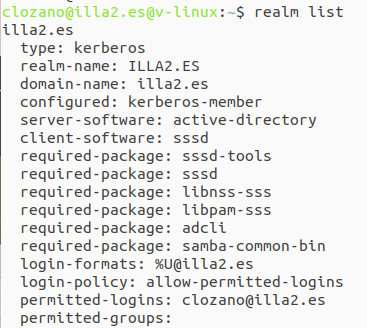
vagrant@plantubuntu-VirtualBox:~$ id lozanoc@illa2.es
uid=190801143(lozanoc@illa2.es) gid=190800513(domain users@illa2.es) groups=190800513(domain users@illa2.es)
Com es pot veure, el AD té constància de què la màquina es troba vinculada.
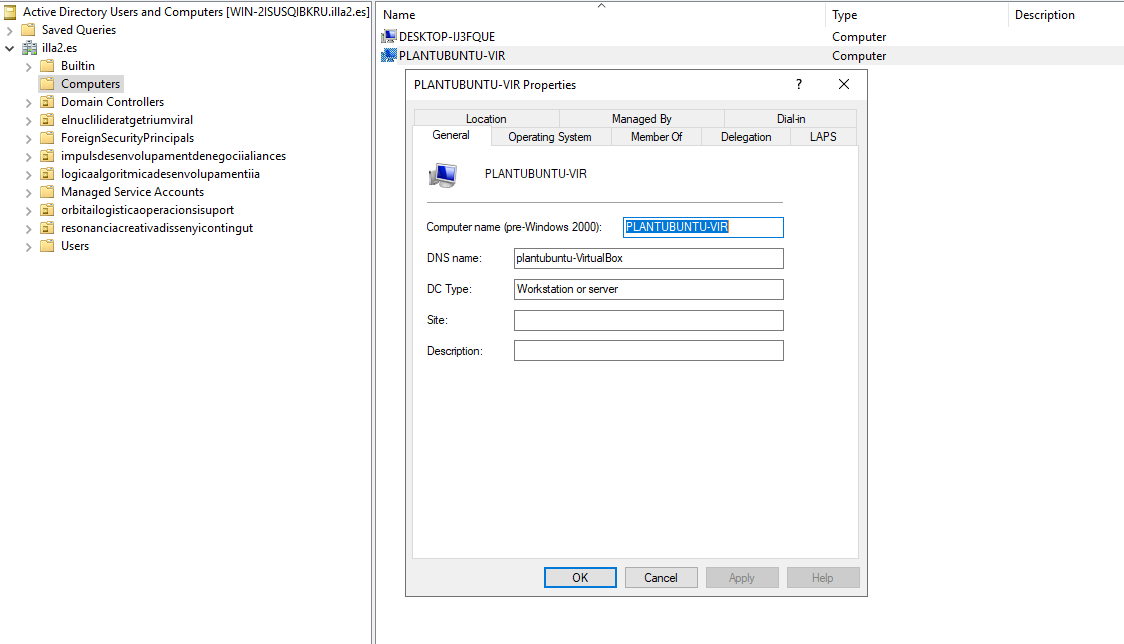
Un cop finalitzada la configuració, cal realitzar les següents proves per verificar que la integració és operativa:
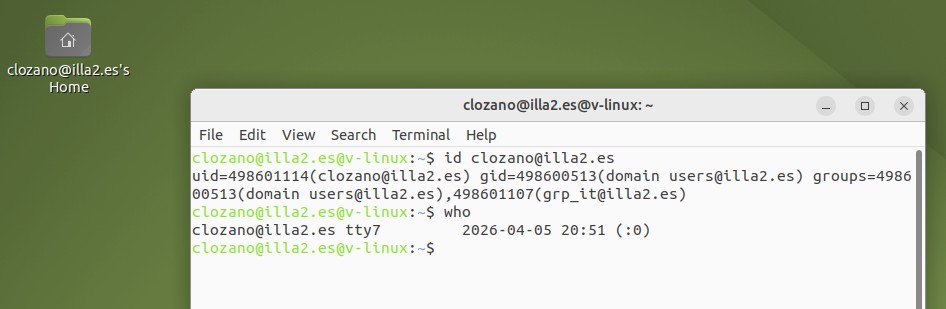
PROVES DE SERVEI FINALS
Verificació d’Identitat: Executar ‘id usuari@domini’ per confirmar que Ubuntu reconeix l’UID/GID i els grups de l’Active Directory.
Autenticació (Login): Provar l’inici de sessió amb ‘su -‘ o via GDM per validar l’accés i la creació automàtica del directori /home.
Resolució DNS: Fer ‘ping’ al nom del domini i al controlador per assegurar que la comunicació de xarxa és correcta.
Permisos i Grups: Verificar que un usuari de l’AD amb permisos de ‘sudo’ pot executar tasques administratives correctament.
Persistència (Offline): Intentar fer login sense connexió a la xarxa per confirmar que el SSSD manté les credencials en memòria cau.
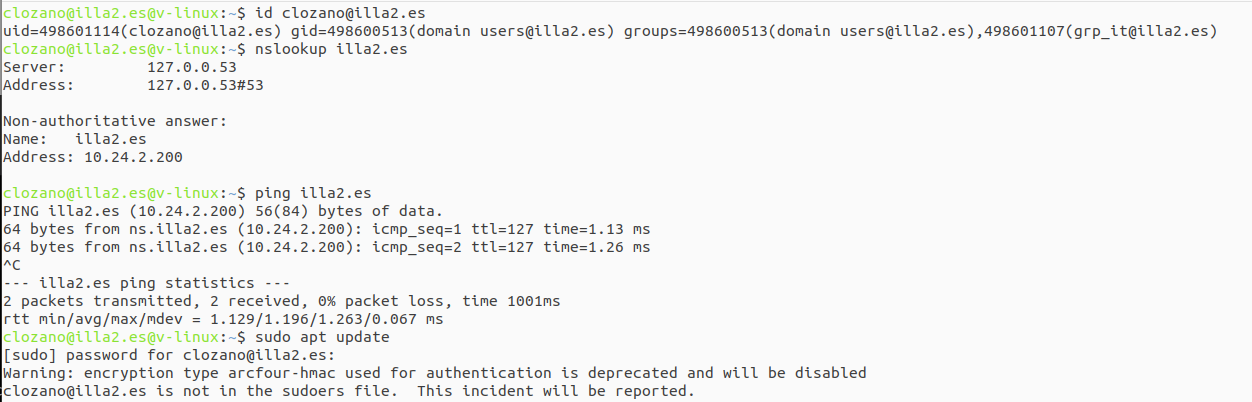
En aquest cas aquest usuari no té permisos per utilitzar “sudo” a la màquina per seguretat amb una GPO.