Connexió client Linux
Primer de tot, farem un update per actualitzar els repositoris, com sempre abans de res, ja que durant 3 setmanes de vacances es necessari.
Refrescat això, ara, instal·larem les utilitats necessàries per fer la nostra vinculació al nostre Servidor AD.
vagrant@plantubuntu-VirtualBox:~$ sudo apt update
vagrant@plantubuntu-VirtualBox:~$ sudo apt install sssd-tools sssd libnss-sss libpam-sss adcli samba-common-bin
Reading package lists... Done
Building dependency tree... Done
Reading state information... Done
sssd-tools is already the newest version (2.9.4-1.1ubuntu6.3).
sssd is already the newest version (2.9.4-1.1ubuntu6.3).
libnss-sss is already the newest version (2.9.4-1.1ubuntu6.3).
libpam-sss is already the newest version (2.9.4-1.1ubuntu6.3).
adcli is already the newest version (0.9.2-1ubuntu2).
The following additional packages will be installed:
  libldb2 libsmbclient0 libwbclient0 python3-ldb python3-samba samba-common samba-dsdb-modules samba-libs smbclient
Suggested packages:
  heimdal-clients python3-dnspython cifs-utils
The following packages will be upgraded:
  libldb2 libsmbclient0 libwbclient0 python3-ldb python3-samba samba-common samba-common-bin samba-dsdb-modules samba-libs smbclient
10 upgraded, 0 newly installed, 0 to remove and 131 not upgraded.
Need to get 0 B/11.4 MB of archives.
After this operation, 0 B of additional disk space will be used.
Do you want to continue? [Y/n] y
(Reading database ... 238406 files and directories currently installed.)
Preparing to unpack .../0-python3-ldb_2%3a2.8.0+samba4.19.5+dfsg-4ubuntu9.4_amd64.deb ...
Unpacking python3-ldb (2:2.8.0+samba4.19.5+dfsg-4ubuntu9.4) over (2:2.8.0+samba4.19.5+dfsg-4ubuntu9.3) ...
Preparing to unpack .../1-python3-samba_2%3a4.19.5+dfsg-4ubuntu9.4_amd64.deb ...
Unpacking python3-samba (2:4.19.5+dfsg-4ubuntu9.4) over (2:4.19.5+dfsg-4ubuntu9.3) ...
Preparing to unpack .../2-smbclient_2%3a4.19.5+dfsg-4ubuntu9.4_amd64.deb ...
Unpacking smbclient (2:4.19.5+dfsg-4ubuntu9.4) over (2:4.19.5+dfsg-4ubuntu9.3) ...
Preparing to unpack .../3-libldb2_2%3a2.8.0+samba4.19.5+dfsg-4ubuntu9.4_amd64.deb ...
Unpacking libldb2:amd64 (2:2.8.0+samba4.19.5+dfsg-4ubuntu9.4) over (2:2.8.0+samba4.19.5+dfsg-4ubuntu9.3) ...
Preparing to unpack .../4-samba-dsdb-modules_2%3a4.19.5+dfsg-4ubuntu9.4_amd64.deb ...
Unpacking samba-dsdb-modules:amd64 (2:4.19.5+dfsg-4ubuntu9.4) over (2:4.19.5+dfsg-4ubuntu9.3) ...
Preparing to unpack .../5-samba-common-bin_2%3a4.19.5+dfsg-4ubuntu9.4_amd64.deb ...
Unpacking samba-common-bin (2:4.19.5+dfsg-4ubuntu9.4) over (2:4.19.5+dfsg-4ubuntu9.3) ...
Preparing to unpack .../6-libsmbclient0_2%3a4.19.5+dfsg-4ubuntu9.4_amd64.deb ...
Unpacking libsmbclient0:amd64 (2:4.19.5+dfsg-4ubuntu9.4) over (2:4.19.5+dfsg-4ubuntu9.3) ...
Preparing to unpack .../7-samba-libs_2%3a4.19.5+dfsg-4ubuntu9.4_amd64.deb ...
Unpacking samba-libs:amd64 (2:4.19.5+dfsg-4ubuntu9.4) over (2:4.19.5+dfsg-4ubuntu9.3) ...
Preparing to unpack .../8-libwbclient0_2%3a4.19.5+dfsg-4ubuntu9.4_amd64.deb ...
Unpacking libwbclient0:amd64 (2:4.19.5+dfsg-4ubuntu9.4) over (2:4.19.5+dfsg-4ubuntu9.3) ...
Preparing to unpack .../9-samba-common_2%3a4.19.5+dfsg-4ubuntu9.4_all.deb ...
Unpacking samba-common (2:4.19.5+dfsg-4ubuntu9.4) over (2:4.19.5+dfsg-4ubuntu9.3) ...
Setting up samba-common (2:4.19.5+dfsg-4ubuntu9.4) ...
Setting up libwbclient0:amd64 (2:4.19.5+dfsg-4ubuntu9.4) ...
Setting up libldb2:amd64 (2:2.8.0+samba4.19.5+dfsg-4ubuntu9.4) ...
Setting up samba-libs:amd64 (2:4.19.5+dfsg-4ubuntu9.4) ...
Setting up python3-ldb (2:2.8.0+samba4.19.5+dfsg-4ubuntu9.4) ...
Setting up samba-dsdb-modules:amd64 (2:4.19.5+dfsg-4ubuntu9.4) ...
Setting up libsmbclient0:amd64 (2:4.19.5+dfsg-4ubuntu9.4) ...
Setting up python3-samba (2:4.19.5+dfsg-4ubuntu9.4) ...
Setting up smbclient (2:4.19.5+dfsg-4ubuntu9.4) ...
Setting up samba-common-bin (2:4.19.5+dfsg-4ubuntu9.4) ...
Processing triggers for man-db (2.12.0-4build2) ...
Processing triggers for libc-bin (2.39-0ubuntu8.6) ...
mon
Una vegada instal·lats els paquets necessaris, i comprovat que ha anat tot bé, vincularem la màquina al domini.
vagrant@plantubuntu-VirtualBox:~$ sudo realm join -v -U vagrant illa2.es
 * Resolving: _ldap._tcp.illa2.es
 * Performing LDAP DSE lookup on: 10.24.2.194
 * Successfully discovered: illa2.es
Password for vagrant:
 * Unconditionally checking packages
 * Resolving required packages
 * Joining using a truncated netbios name: PLANTUBUNTU-VIR
 * LANG=C /usr/sbin/adcli join --verbose --domain illa2.es --domain-realm ILLA2.ES --domain-controller 10.24.2.194 --computer-name PLANTUBUNTU-VIR --login-type user --login-user vagrant --stdin-password
 * Using domain name: illa2.es
 * Using computer account name: PLANTUBUNTU-VIR
 * Using domain realm: illa2.es
 * Sending NetLogon ping to domain controller: 10.24.2.194
 * Received NetLogon info from: WIN-2ISUSQIBKRU.illa2.es
 * Wrote out krb5.conf snippet to /var/cache/realmd/adcli-krb5-nWmhRr/krb5.d/adcli-krb5-conf-7umqaF
 * Authenticated as user: vagrant@ILLA2.ES
 * Using GSS-SPNEGO for SASL bind
 * Looked up short domain name: ILLA2
 * Looked up domain SID: S-1-5-21-2037980830-2354978206-3898932875
 * Received NetLogon info from: WIN-2ISUSQIBKRU.illa2.es
 * Using fully qualified name: plantubuntu-VirtualBox
 * Using domain name: illa2.es
 * Using computer account name: PLANTUBUNTU-VIR
 * Using domain realm: illa2.es
 * Enrolling computer name: PLANTUBUNTU-VIR
 * Generated 120 character computer password
 * Using keytab: FILE:/etc/krb5.keytab
 * A computer account for PLANTUBUNTU-VIR$ does not exist
 * Found well known computer container at: CN=Computers,DC=illa2,DC=es
 * Calculated computer account: CN=PLANTUBUNTU-VIR,CN=Computers,DC=illa2,DC=es
 * Encryption type [3] not permitted.
 * Encryption type [1] not permitted.
 * Created computer account: CN=PLANTUBUNTU-VIR,CN=Computers,DC=illa2,DC=es
 * Trying to set computer password with Kerberos
 * Set computer password
 * Retrieved kvno '2' for computer account in directory: CN=PLANTUBUNTU-VIR,CN=Computers,DC=illa2,DC=es
 * Checking RestrictedKrbHost/plantubuntu-VirtualBox
 *    Added RestrictedKrbHost/plantubuntu-VirtualBox
 * Checking RestrictedKrbHost/PLANTUBUNTU-VIR
 *    Added RestrictedKrbHost/PLANTUBUNTU-VIR
 * Checking host/plantubuntu-VirtualBox
 *    Added host/plantubuntu-VirtualBox
 * Checking host/PLANTUBUNTU-VIR
 *    Added host/PLANTUBUNTU-VIR
 * Discovered which keytab salt to use
 * Added the entries to the keytab: PLANTUBUNTU-VIR$@ILLA2.ES: FILE:/etc/krb5.keytab
 * Added the entries to the keytab: host/PLANTUBUNTU-VIR@ILLA2.ES: FILE:/etc/krb5.keytab
 * Added the entries to the keytab: host/plantubuntu-VirtualBox@ILLA2.ES: FILE:/etc/krb5.keytab
 * Added the entries to the keytab: RestrictedKrbHost/PLANTUBUNTU-VIR@ILLA2.ES: FILE:/etc/krb5.keytab
 * Added the entries to the keytab: RestrictedKrbHost/plantubuntu-VirtualBox@ILLA2.ES: FILE:/etc/krb5.keytab
 * /usr/sbin/update-rc.d sssd enable
 * /usr/sbin/service sssd restart
 * Successfully enrolled machine in realm
Comprovació i proves funcionament
Una vegada vinculat, comprovarem amb aquestes simples comandes on ens dirà si tenim la màquina vinculada, a on estem vinculats i comprovarem si tenim accés als usuaris de dins la màquina.
vagrant@plantubuntu-VirtualBox:~$ realm list
illa2.es
  type: kerberos
  realm-name: ILLA2.ES
  domain-name: illa2.es
  configured: kerberos-member
  server-software: active-directory
  client-software: sssd
  required-package: sssd-tools
  required-package: sssd
  required-package: libnss-sss
  required-package: libpam-sss
  required-package: adcli
  required-package: samba-common-bin
  login-formats: %U@illa2.es
  login-policy: allow-realm-logins
vagrant@plantubuntu-VirtualBox:~$ id lozanoc@illa2.es
uid=190801143(lozanoc@illa2.es) gid=190800513(domain users@illa2.es) groups=190800513(domain users@illa2.es)vagrant@plantubuntu-VirtualBox:~$ id lozanoc@illa2.es
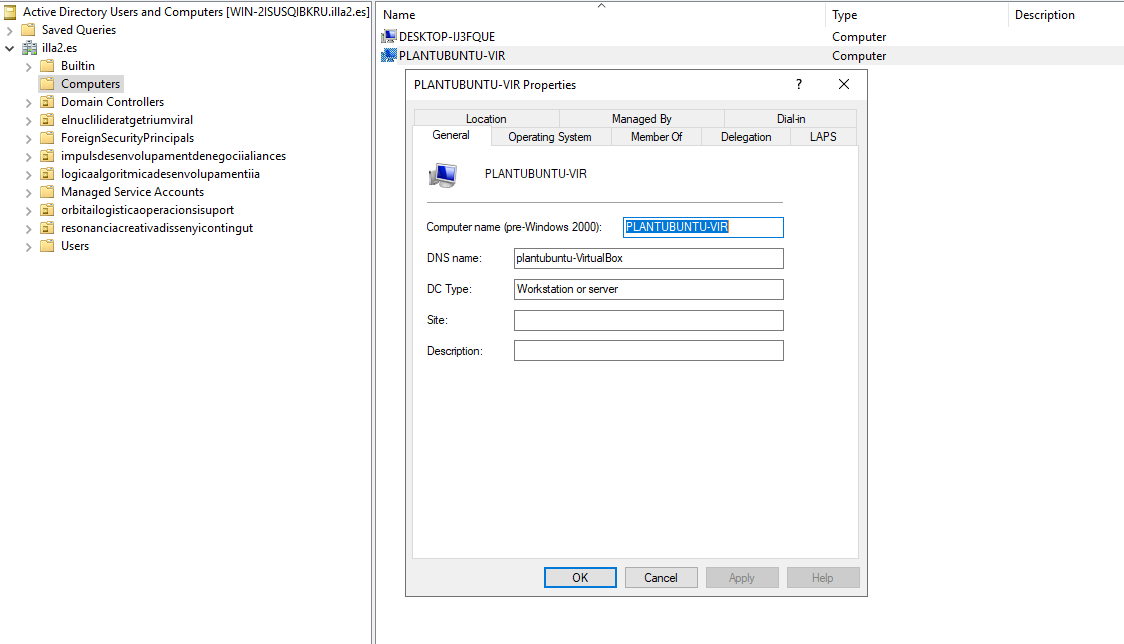
uid=190801143(lozanoc@illa2.es) gid=190800513(domain users@illa2.es) groups=190800513(domain users@illa2.es)Com es pot veure, el AD té constància de què la màquina es troba vinculada.